Is this Blox Fruits or Blox Football League?
No. This beginner guide is Place 118675786171302 car soccer by blox league gaming only.

This Blox League beginner guide is the first-session playbook for Roblox car soccer on Place 118675786171302 (Blox League, group blox league gaming). The listing line is short: “Car soccer with ranked and casual 1v1, 2v2, and 3v3, plus trading and car customization.” In practice you join the stadium, pick casual or ranked, queue 1v1, 2v2, or 3v3, drive a car, contest a ball, and shoot the other net. Trading and car customization are listed. A seasonal pass is still COMING SOON. Roblox Premium / Plus is listed at 1.5× XP per match. Verified October 2, 2026 · Live car-soccer listing · seasonal pass still COMING SOON.
This is not Blox Fruits and not Blox Football League. Those titles share a “Blox” label and steal search traffic. Confirm Place 118675786171302 on the join card before you copy anyone’s settings. Rank names, XP curves, and car damage numbers are unpublished, so this Blox League beginner guide will not invent them. Community recaps (separate from the listing) cover camera shake, FOV, ball cam, boost pads, keyboard drift on Shift, training, and garage names such as Octane, Fennec, and Dominus. Play on Roblox.
| Fact | Detail | Source |
|---|---|---|
| Platform | Roblox · Desktop, Mobile, Console, Tablet | Listing |
| Genre | Sports & Racing · car soccer | Listing |
| Modes | Ranked and casual 1v1 / 2v2 / 3v3 | Listing |
| Server size | Max 10 players | Listing |
| Trading | Listed as a feature | Listing |
| Car customization | Listed as a feature | Listing |
| Premium XP | 1.5× XP from every match | Listing |
| Season pass | COMING SOON (not a live farm) | Listing |
| Place | 118675786171302 | Listing |
| Developer | blox league gaming | Listing |
| Camera shake | Turn off in settings (community recap) | Community recap |
| FOV | Set high (community recap) | Community recap |
| Ball cam | Learn it early (community recap) | Community recap |
| Drift | Shift on keyboard (community recap) | Community recap |
| Garage names heard | Octane, Fennec, Dominus — no official stat sheet | Community recap |
Open Roblox, search Blox League, and check Place 118675786171302 before you load. The experience is car soccer, not fruit grinding and not a football-manager sim. Roblox · Desktop, Mobile, Console, Tablet. After the stadium HUD appears, pick casual and 1v1 for the first queue. Casual is the listing’s low-stakes lane. Ranked exists on the same 1v1 / 2v2 / 3v3 split, but this Blox League beginner guide keeps ranked until you can contest the ball without panic. Rank titles themselves stay TBA.
Kickoff is drive, boost if a pad is in your path, and meet the ball. You do not need a mechanic tree. Hit the ball toward the far net, recover, and do it again. Match clocks and overtime rules are unpublished; trust the HUD timer. When the match ends, XP is a match grant. Premium is listed at 1.5× on that grant. A season pass is still COMING SOON, so do not stall the first session waiting for a battle-pass track. Mode labels and party sizes sit on modes.

You loaded the right Place, you queued, you hit the ball at least once, and you saw a score. That is a finished first match. Customization and trading are listing features you can open later from cars and trading. Codes are a separate hunt with an empty verified list — see codes.
Blox Football League is a different product. Blox Fruits is a different product. Super Blox Soccer recaps and vintage Roblox soccer videos will teach you the wrong HUD. If the field is cars plus a giant ball in a stadium with 1v1–3v3 queues, you are in this beginner guide’s game. If it is swords, fruit abilities, or eleven-a-side football kits, leave.
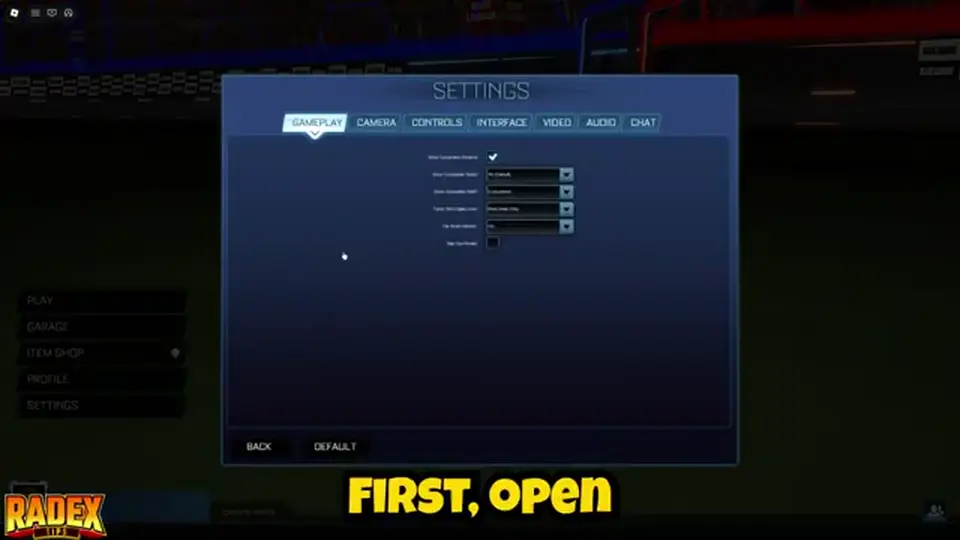
Community recaps agree on three camera changes before you grind mechanics. Turn camera shake off so contact with the ball does not rattle the view. Set FOV high so you see more of the pitch around the car. Learn ball cam so the camera stays on the ball instead of only on the hood. Recaps say ball cam feels odd for a few games and is still worth keeping on. This Blox League beginner guide will not print a full keybind table. Device HUDs differ across Roblox · Desktop, Mobile, Console, Tablet, and a guessed Xbox diagram would be fiction.
If a recap mentions a controller, treat that as “pads work,” not as a button map. Read the in-game controls screen after load and use what it labels. Training (community recap) is the place to feel camera changes without a 2v2 teammate yelling. Ranked settings are the same cameras; ranked is not a different FOV mode. Leave shake off when you later open ranked.
| Control | Beginner action | Source |
|---|---|---|
| Camera shake | Off | Community recap |
| Field of view | High | Community recap |
| Ball cam | On and practiced | Community recap |
| Drift / handbrake | Shift on keyboard (other devices: HUD label) | Community recap |
| Boost pads | Take pads on your path to the ball | Community recap |
| Full bind list | Use the in-game controls screen — not invented here | This guide |
Car soccer reads speed and ball height. Shake adds motion that is not the play. Recaps call this the first settings change because it is free and reversible. If you dislike the still camera after a match, you can turn shake back on. Most new players who keep shake on blame their car when the camera is the noise.
Ball cam locks the view to the ball so you can track where the next contest is. Recaps say to use it as often as you can. If you lose the car’s nose for a second, glance without ball cam, then return. Do not invent a “best cam key” here. Whatever toggle the HUD shows is the one you practice in training.
The listing gives ranked and casual across 1v1, 2v2, and 3v3. Community recaps split the learning path: 1v1 if you are solo, because every challenge, save, and miss is yours; doubles with a friend if you have a party. That is the Blox League beginner guide rule. 3v3 is listed and is fine after you can hit the ball, but it hides your mistakes behind two other cars.
Casual first, then ranked. Rank names, MMR numbers, and placement-match counts are unpublished. Do not copy a fake bronze-to-SSL chart from another car-soccer title. Party size and queue labels are on modes. What ranked is allowed to mean, without a ladder dump, is on ranked.
| Queue | When to use it | Source |
|---|---|---|
| Casual 1v1 | First sessions; learn hits, saves, kickoff | Community recap + listing modes |
| Casual 2v2 | With a friend (doubles) | Community recap + listing modes |
| Casual 3v3 | After you can contest the ball in smaller modes | Listing |
| Ranked 1v1 / 2v2 / 3v3 | After casual no longer feels like a panic | Listing; rank names TBA |
Queue casual 1v1. You will get scored on. That is the point. Recaps also say you do not have to dive the ball every time: wait, save, then counter. Boost into an opponent’s car to knock them off the play is a recap mechanic, not a required day-one trick. Score, then recover to your half.
Doubles is the recap pick for a duo. Decide who is first challenge and who is last back before kickoff, even if the rule is only “I go, you stay.” 3v3 with randoms can wait. Trading and the item shop (community recap that a shop exists) are lobby features, not a substitute for a second match.
The listing confirms car customization. It does not publish hitboxes, top speed, or DPS. Community recaps name Octane, Fennec, and Dominus in the garage. Recaps often call Octane a comfortable default hitbox. That is a recap opinion, not an official stat row. This Blox League beginner guide will not rank those bodies with invented numbers. Open the garage, pick a body you can see, play 1v1, and switch if the car feels huge or tiny against the ball.
Item shop (community recap) and cosmetics are not ranked power unless the live HUD shows a number. Treat paint as paint. Details stay on cars and customization. Trading is listed; there is no official price list — trading.
| Name in recaps | What this page will say | What this page will not say |
|---|---|---|
| Octane | Named in garage recaps; common default pick in those recaps | No invented hitbox units or DPS |
| Fennec | Named in garage recaps | No speed table |
| Dominus | Named in garage recaps | No “best car” lock |
| Everything else | Use the live garage list | No icon pack — none published |
There is no verified public icon set to stamp beside each body. This page uses a text table on purpose. If a site shows a stolen Rocket League icon grid, ignore it. Your garage is the roster.
Listing: customization exists. Community recap: a shop exists. Neither is a reason to sit in the menu for twenty minutes before match two. Drive first. Cosmetics after you can hit a grounded ball.
Community recaps say the ball will not stay on the ground, so you need contact in the air. They also say training is where you learn that contact, and that real matches still matter because opponents challenge, block, and steal. This Blox League beginner guide will not invent jump-plus-boost sequences, double-jump frames, or a controller diagram. Open training, send the ball up, and practice meeting it with the nose of the car. When that starts to land, queue casual 1v1 and accept messy aerials.
Ground play still wins early games. Recaps put boost pads, ball cam, and “wait instead of diving” next to aerials on purpose. An aerial you miss is an open net behind you. Take the grounded shot if it is there. Goal clips are the reward for a clean touch, not proof you need a mechanic name from another franchise.

Training (community recap) is isolated reps: camera, boost path, air contact. Matches add opponents who will not wait. Recaps say both. Do not live in training for a week. Alternate: ten minutes of training, then a casual 1v1, then settings check if shake crept back on.
Keyboard recaps name Shift as drift / handbrake for sharper rotation on the ground. That is one published-in-recap bind this page will repeat. Aerial binds stay on your HUD. If Shift does nothing on your device, look at the controls list instead of copying a PC recap onto a phone.
Chasing every ball with empty boost, leaving the net empty in 2v2, and treating garage cosmetics as ranked stats are the usual stalls. Recaps also warn against diving first every play. Save, then counter. Boost pads exist to refill for the next contest, not to be ignored until you stall under the ball. Premium 1.5× XP (listing) does not replace hitting the ball; it only multiplies match XP you already earned.
Do not farm a season pass that is still COMING SOON. Do not paste Blox Fruits strings into this HUD. Do not join a Blox Football League Discord and expect this Place’s rules. XP math that is actually listed lives on xp. The rest of the loop is still: queue, drive, contest, score, then customize or trade if you want.
Shake on, FOV low, ball cam never tried. Fix those before you blame the car. They are community-recap settings, reversible, and cheaper than a shop purchase.
Ranked 3v3 as match one hides your mistakes and punishes your teammates. Casual 1v1 is the Blox League beginner guide default. Move up when kickoff is no longer a coin-flip you lose every time because you never drove.
Read modes for 1v1–3v3, then ranked when casual is comfortable.
Garage without fake DPS: cars. Paint: customization.
Empty code table: codes. Match XP: xp.
Hubs: guides hub · wiki hub.
No. This beginner guide is Place 118675786171302 car soccer by blox league gaming only.
Casual 1v1, camera shake off, high FOV, ball cam. Then casual 2v2 with a friend. Ranked after you can contest the ball.
Unpublished. Recaps name Octane, Fennec, and Dominus in the garage. No official DPS or hitbox sheet — pick in the live garage.
Community recaps say yes. Read the in-game controls screen. This page will not invent a button list.
The listing still says COMING SOON. Premium 1.5× XP per match is the listed XP perk that is live.
Practice air contact in training (community recap), but grounded hits and boost pads win early casual 1v1s. No bind dump here.
Matched by build plan, shared topics, and guide progression — not random related links.